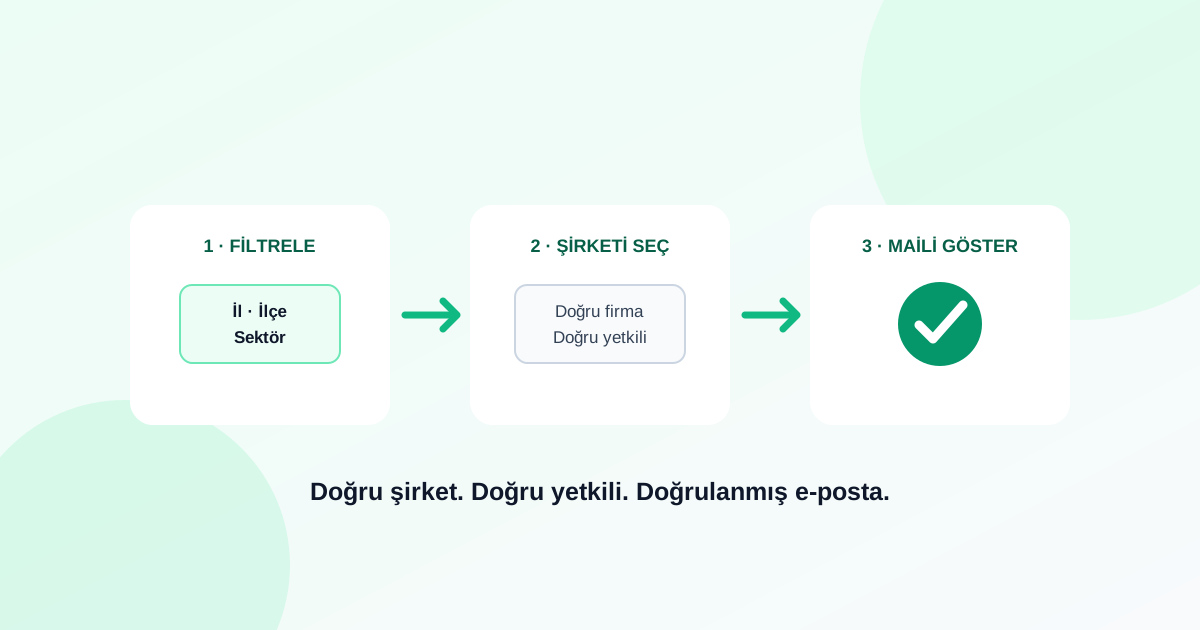
You do not need to spend hours searching websites or rely on stale spreadsheets to find a company email. With a FreshSignal subscription, you filter the companies you want, choose the relevant decision-maker and unlock the verified email already available on the platform. FreshSignal handles the data work; your job is to define who you want to sell to.
This guide covers both real FreshSignal workflows: finding an email for one named company and building a targeted list across hundreds of companies. Both lead to the same outcome — the right company, the right role and a verified contact ready for your sales process.
Define the right customer before looking for an email
A useful sales list starts with an ideal customer profile, not an email column. FreshSignal lets you narrow the UK and Turkish company catalogues by the criteria that matter to your offer.
- Country and location: choose the UK or Turkey, then narrow by available city and district fields.
- Industry: use NACE/SIC hierarchy to move from a broad sector to a precise business activity.
- Company type: include the legal forms that match your customer profile.
- Digital presence: require a website, verified email, telephone, LinkedIn or another useful signal.
- Legal status: keep companies with identified insolvency or concordat events out of an ordinary sales list.
💡 Write the filter like a sales brief
Find an email for one company
- Search the company. Compare its name, location and industry to open the correct record.
- Check the verified-email indicator. Where FreshSignal has a verified contact, the profile shows a verified or locked email signal.
- Open the People section. Choose a founder, board member, executive or employee by their job title.
- Select “show email”. Unlock the verified address with a contact credit. If no verified address exists, FreshSignal does not substitute an unverified guess.
- Choose the next action. Add the company to a list, save the person to CRM, send a quote or start a cold-email sequence.
FreshSignal is not designed to show a possible email. It is designed to put a verified contact in the context of the correct company and decision-maker.
Choose the right decision-maker
The People section shows names and job titles, with source badges such as Web, LinkedIn and KAP where applicable. Use the role that owns the problem your product solves: Operations or IT for software, Procurement or Production for machinery and supplies, Finance for financial services, and Marketing for acquisition services.
Build a verified email list at scale
For a market-wide list, open Panel → Exports. Choose Official Registry for company rows or People for executives and employees, then apply the filters that describe your market.
- Select the source: Official Registry for companies, People for named decision-makers.
- Choose location and industry: combine available city, district and NACE/SIC filters.
- For People, add title and seniority: target board, top management, investor relations, employees or a phrase in the job title.
- Require email presence: set the email field under Digital Presence to “Has”.
- Exclude distressed companies where appropriate: use the recommended legal-status filter.
- Review the estimate: see the approximate matching company or people count and email coverage before export.
- Use the Sales List column preset: select company, location, phone, email and website in one click.
- Export or send to CRM: download CSV/XLSX or create a FreshSignal CRM list directly.
What assurance does FreshSignal provide?
FreshSignal does not present unverified email guesses as usable contact data. An email indicator in the profile or export workflow means that the platform has a detected and verified contact record. If a verified address is unavailable, the product does not hand the user a randomly constructed substitute.
- See availability before unlocking: focus credits on records with a verified-email indicator.
- No unverified substitute: a missing verified contact remains missing rather than becoming a guess.
- No double charge: a contact you previously unlocked does not consume another credit elsewhere in FreshSignal.
- Context stays attached: the person, role, company and visible source badge remain together.
- Repeat protection: optionally exclude people you already exported or contacted from a new file.
ℹ️ Verification is strong assurance, but businesses still change
Turn the verified email into a sales action
- Add to a list for a focused campaign audience.
- Save to CRM and manage the person through pipeline stages, notes and tasks.
- Start a cold-email sequence with planned follow-ups.
- Run a bulk campaign from the same target list.
- Send or request a quote from the company workflow.
- Export CSV/XLSX when the data needs to move to another system.
The short answer
Sign up for FreshSignal, filter your market by location and industry, choose the relevant decision-maker on a company profile or in the People source, and select “show email” on a record with a verified-email indicator. Then move the contact into CRM, a list, a campaign, a cold sequence or an export.
💡 Build your first list
Does FreshSignal show unverified email guesses?
No. Unverified guesses are not presented as usable contact information. If no verified address is available, FreshSignal does not provide a randomly generated substitute.
How do I find the right decision-maker?
Use the People section on a company profile to review names and roles. At scale, choose the People source and filter by title and seniority such as board or top management.
Can I filter only companies with email?
Yes. In Exports, set email under Digital Presence to “Has” to focus on records where an email contact is available.
Will the same email use another credit later?
No. A previously unlocked contact does not consume another credit in other FreshSignal tools, and repeat protection can remove previously exported or contacted records from new files.
Can I export the emails to Excel?
Yes. Export the target list as CSV or XLSX, use the one-click Sales List column preset, or send the result directly to a FreshSignal CRM list.