When a customer asks you "Could you send me a quote?", you have actually reached one of the most critical moments in the sale. Every meeting, email and phone call you have had up to that point crystallises into a single document that lands in front of the customer. That document is the quote. A well-prepared quote closes the deal; a careless one can cool off even your warmest prospect.
In this guide we answer, end to end, the questions of what a quote is, how a quote differs from a proforma and an invoice, how to calculate VAT and discounts correctly, what the anatomy of a strong proposal should look like, and how to prepare a professional quote step by step. We will also introduce the FreshSignal Quote Tool, which lets you do all of this in minutes without wrestling with manual spreadsheets.
ℹ️ Who is this guide for?
What Is a Quote?
A quote is a written document in which a seller offers to supply specific goods or services to a customer at a specific price and on specific terms. It is often also referred to as a quotation, a price quote or a proposal. Once the buyer says "yes", the quote forms the basis of an agreement.
Put simply, a quote is where the seller clearly answers a handful of questions: What am I selling? At what price? On what terms, and until when is it valid? The customer reviews this document to make a decision, compares quotes from different suppliers, and starts the purchasing process.
A quote typically contains: seller company details, customer (buyer) details, a list of the items offered (description, unit, quantity, unit price), discount and VAT, a subtotal and grand total, the validity period, payment and delivery terms, and contact details. We will cover each of these sections one by one later in the guide.
The Difference Between a Quote, a Proforma and an Invoice
The three documents most often confused are the quote, the proforma invoice and the invoice. All three look similar because they contain line items, prices and totals; however, their purpose and legal standing differ.
| Document | Purpose | When is it issued? | Binding status / accounting |
|---|---|---|---|
| Quote | To present the seller's price and terms proposal | Before the sale, before the customer decides | It is a proposal; no order exists until the customer accepts |
| Proforma invoice | An advance-information draft in invoice format (especially for export/customs and prepayment processes) | Just before the order is finalised | Not an official financial document; creates no accounting entry |
| Invoice | To document a completed sale and create a payment/tax record | After goods or services are delivered / the sale takes place | An official financial document; enters the accounting and tax records |
In short: the quote says "here is a proposal I am offering", the proforma says "if we agree, the invoice will look roughly like this", and the invoice says "the sale has happened, here is the official document". Quotes and proformas belong to the persuasion and progression stages; the invoice belongs to the stage where the deal is concluded.
💡 Practical tip
A Quote Through 5W1H: What, Why, Who, Where, When, How
The quickest way to grasp the concept of a quote is the 5W1H framework. The infographic below summarises the six core questions of a quote; we explain each one briefly straight after.
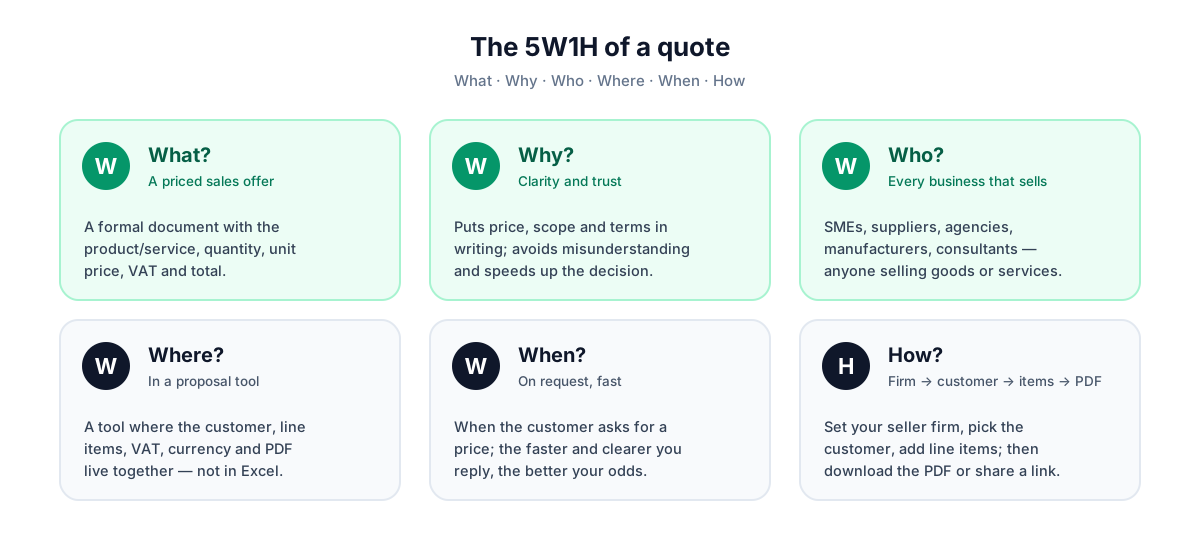
What? (What a quote is)
A quote is a written proposal in which the seller offers a product or service at a specific price and on specific terms. It brings together line items, prices, VAT, discount, total amount and validity period.
Why? (Why a quote is prepared)
It is prepared to persuade the customer, to make different suppliers comparable, to set out price and scope in writing, and to speed up the purchasing decision. Verbal prices are forgotten; a written quote is permanent.
Who? (Who prepares it, and for whom)
The selling party (a business, sales representative, freelancer, agency, manufacturer or wholesaler) prepares it; it is drawn up for the buying party (an individual or corporate customer, or a procurement team).
Where? (Where it is used)
It is used in B2B sales, tenders, projects, service agreements, exports (together with a proforma) and recurring sales relationships. Today it is largely delivered digitally as a PDF or a shareable link.
When? (When it is sent)
It is sent after the customer has clarified their need and asked for a price, but before an order is placed. A quote also has a validity period; after the stated date, the prices are no longer binding.
How? (How it is prepared)
You define your seller company, choose the customer, enter the line items (unit, quantity, unit price, VAT, discount), the totals are calculated automatically, and you share the quote as a PDF or a link. We will walk through this process step by step later in the guide.
Why Does a Quote Matter?
For most businesses, the quote is the most critical turning point in the sales funnel. The customer may already trust your brand, your product and your personal relationship; but when making the final decision, the only concrete document in front of them is the quote. That is why the quality of your quote directly affects your close rate.
- It builds trust: a professional, tidy and error-free quote reflects your company's seriousness.
- It enables comparison: when the customer places it side by side with competitors' quotes, a clear and readable one stands out.
- It prevents misunderstandings: because scope, price and terms are in writing, there is no later dispute over "that's not how I understood it".
- It speeds up the decision: a clear total, a validity period and payment terms encourage the customer to decide quickly.
- It enables follow-up: by tracking the status of the quote you sent, you can follow up at the right moment.
The sale does not end when you send the quote; it really begins when you send the quote. A good quote is the document that makes it easy for the customer to say "yes".— A general rule for sales teams
Who Uses Quotes? Sector Scenarios
Quote preparation is not specific to a single sector. Almost anyone selling goods or services produces a quote in one form or another. Here are some typical scenarios:
Manufacturers and wholesalers
A manufacturer sends its dealer or corporate buyer a detailed quote with unit prices, quantity breakdowns, discount rates and VAT. Tiered pricing, where the discount rate changes as quantity increases, is common.
Service firms and agencies
A digital marketing agency or software company lists package-based services (monthly consultancy, campaign management, development hours) item by item. Here the description field is especially important, because the scope of the service comes before the price.
Freelancers and independent professionals
A graphic designer or consultant prepares a project-based or hourly quote. A professional PDF quote makes even a one-person business look established.
Exporters
In exports, a quote often requires multiple currencies (USD, EUR) and frequently converts into a proforma invoice. Being able to calculate on the current exchange rate becomes critical here.
Retail and project work
For project-based work such as furniture, refurbishment or corporate equipment, a quote is the cleanest way to present the scope of the work, the line items and the total budget to the customer in a single document.
ℹ️ The common thread
The Anatomy of a Good Quote
A good quote is not a random price list; it follows a specific structure. The illustration below shows all the sections a strong quote should have.
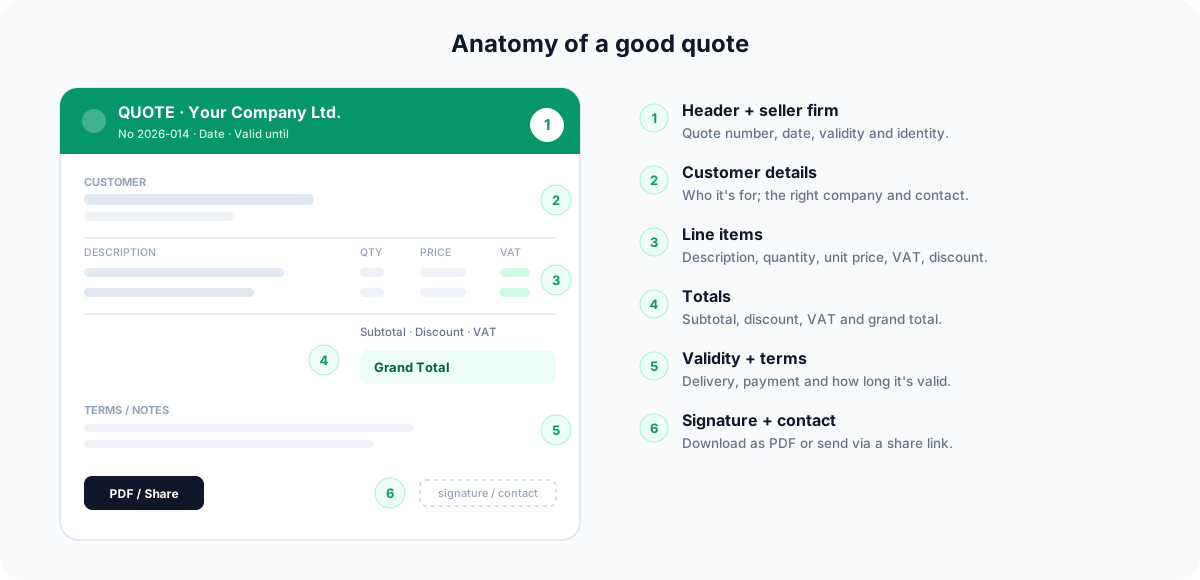
1. Header and seller company details
At the very top of the quote sit your company name, logo, address, phone and email details. This lets the customer see at a glance "who it came from" and reinforces brand trust.
2. Customer (buyer) details
Who the quote is prepared for: the customer's company name, contact person, address and contact details. Naming the correct point of contact increases the quote's personal touch and seriousness.
3. Line items
This is the heart of the quote. For each item: a description, a unit (piece, kg, hour, m², etc.), a quantity, a unit price, a VAT rate and, where applicable, a discount (%). The clearer the descriptions, the more comfortably the customer can decide.
4. Subtotal, VAT and grand total
The post-discount amount of the items gives the subtotal, the tax added on top gives the VAT, and the sum of these gives the grand total. Making these three lines clear and readable directly affects the customer's confidence.
5. Validity period and terms
How long the quote is valid for, payment terms, delivery time and any special notes. The validity period both protects you against price fluctuations and encourages the customer to decide.
6. Signature and contact
The person/company who prepared the quote and their contact details. Knowing who to reach when they have a question speeds up the customer's process.
How Do You Prepare a Quote? A Step-by-Step Process
The quote preparation process can be reduced to five clear steps. The illustration below summarises this flow; we then explain each step one by one.
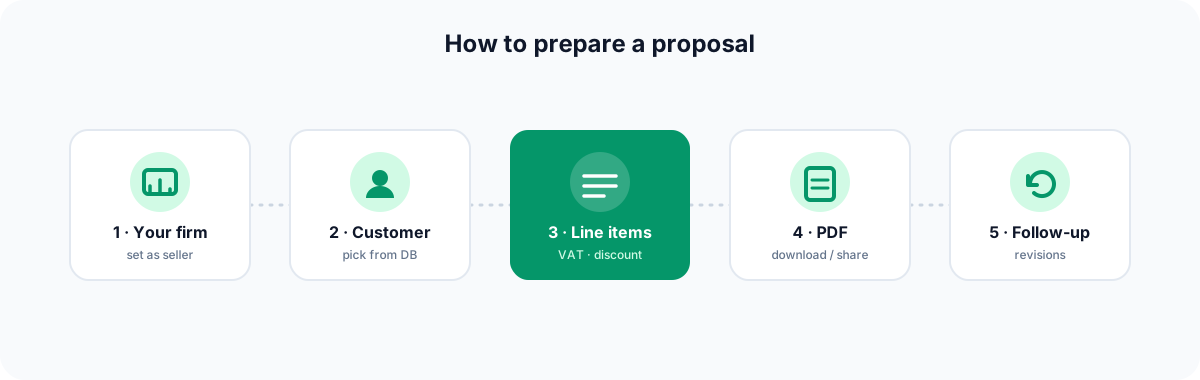
- Define your seller company: first of all, you set up your own company details (name, logo, address, contact). Once done, this is ready for every future quote.
- Choose the customer: you decide who the quote is for. You can select the customer from the existing database via typeahead, or type it in manually.
- Add the line items: for each item you enter a description, unit, quantity, unit price, VAT rate and discount (%). The subtotal, VAT and grand total are calculated automatically.
- Download PDF or share: you can download the quote as a professional PDF and send it by email, or create a shareable link so the customer can view it in the browser.
- Follow up and revise: you track the status of the quote and, when needed, create a revision and keep the current version in one place.
💡 A time-saving habit
How Is VAT Handled?
VAT (Value Added Tax) is one of the most important elements directly affecting the total amount of the quote. Different products and services may be subject to different VAT rates, so you need to select the correct rate for each item.
VAT usually works like this in a quote: first the post-discount amount of each item is calculated, and the sum of these gives the subtotal (the amount excluding VAT). Then the tax amount is calculated according to each item's VAT rate and totalled. The sum of the subtotal and the VAT amount forms the grand total (the amount payable including VAT).
⚠️ A common mistake
How Are Discounts Applied?
A discount is the reduction you offer the customer, and it is usually expressed as a percentage (%). A discount is the most common way to make a quote attractive; however, where and how it is applied significantly changes the total amount.
- Line-item discount: when you want to apply a reduction to a single product, you enter a percentage in that item's discount field.
- Volume discount: used in tiered pricing such as "10% off for 100 units and above".
- Order of calculation: the correct approach is usually to apply the discount first and calculate VAT on the discounted amount; that way the customer pays VAT on the reduced price.
In the FreshSignal Quote Tool, when you enter a discount rate for each item, the subtotal, VAT and grand total are automatically recalculated; there is no need for manual multiplication and addition, and no risk of error.
Multiple Currencies and Exchange Rates
If you work with overseas customers or price in foreign currency, the quote needs to be prepared in the correct currency and at the current exchange rate. Because rates can change within a few days, manual calculation is both tiring and risky.
The FreshSignal Quote Tool supports multiple currencies with central-bank exchange-rate integration. So while preparing your quote in different currencies such as USD or EUR, you can work at the current rate and keep consistency in export and foreign-currency quotes.
ℹ️ Why does the current rate matter?
Common Mistakes When Preparing Quotes
Despite a good product and the right price, many quotes are lost because of simple mistakes. The most common ones:
- Vague item descriptions: if the customer does not fully understand what they are buying, they cannot decide. Every item must be clearly defined.
- No validity period: a quote with no stated period can resurface months later and trigger a price dispute.
- Not showing VAT and discounts clearly: when it is not visible how the total is built up, trust is undermined.
- Incorrect calculation: manual multiplication and addition errors in a spreadsheet are the most trust-damaging of all.
- A careless appearance: a quote with no logo, untidy and inconsistent fonts makes the company look amateurish.
- Not following up: leaving a quote unattended after sending it lets warm opportunities go cold.
- Skipping payment and delivery terms: if the terms remain unclear, friction arises after the agreement.
⚠️ The most critical mistake
Quote Follow-Up and Revisions
Sending a quote is only half the job. The real difference comes from knowing where a sent quote stands and being able to update it quickly when needed.
Why does follow-up matter?
After receiving a quote, a customer usually does not decide immediately; they compare, wait for internal approval and review their budget. A reminder made at the right time closes the sale, while a follow-up that never happens lets the opportunity quietly disappear.
Why are revisions needed?
Customers often come back with requests like "let's remove that item", "let's increase the quantity", or "could you apply that discount?". Instead of preparing a document from scratch every time, creating a revision of the existing quote is both faster and keeps it clear which version is current.
The FreshSignal Quote Tool supports revision tracking; when you change a quote, you can keep track of the current version in an orderly way. There is also an RFQ (request for quotation) module for collecting quote requests coming from customers.
How Do You Prepare a Quote With FreshSignal?
The FreshSignal Quote Tool lets you complete the entire process described above in one place, in minutes. You prepare professional quotes without wrestling with spreadsheets and without the risk of calculation errors.
- Define your company: you enter your seller company details once; they are ready for every future quote.
- Choose the customer: you select the customer from a database of 7.9 million companies via typeahead, or type it in manually.
- Add the line items: you enter description, unit, quantity, unit price, VAT rate and discount; the subtotal, VAT and grand total are calculated automatically.
- Use the catalogue and presets: you quickly add items from saved products and shorten the process with ready-made templates (presets).
- Multiple currencies: with central-bank exchange-rate integration you prepare foreign-currency quotes at the current rate.
- Download PDF or share a link: you download the quote as a PDF, or let the customer view it in the browser via a shareable link.
- Follow up and revise: you track the status of the quote, create revisions when needed, and manage incoming requests with the RFQ module.
💡 Everything in one place
Which Plan Includes the FreshSignal Quote Tool?
The FreshSignal Quote Tool is included in the Starter ($19) plan. On this plan you also get access to the CRM and the company database alongside the quote tool; in other words, the whole flow — from finding your customer to sending the quote — runs within the same plan.
- Starter ($19): quote tool + CRM + company data together.
- Professional: advanced distribution tools such as bulk email and email sequences are included in this higher plan.
For up-to-date plan details and a comparison, take a look at the pricing page, or head to the dashboard to get started straight away.
Summary
A quote is a written proposal in which the seller offers a product or service at a specific price and on specific terms, and it is the most critical turning point in most sales. A good quote contains clear line items, correct VAT and discounts, open totals and a distinct validity period. What sets a quote apart from a proforma and an invoice is its purpose and stage: a quote presents a proposal, a proforma is a pre-agreement draft, and an invoice documents the completed sale.
We can summarise the process in five steps: define your company, choose the customer, add the line items, share via PDF or link, and follow up and revise when needed. Instead of doing these steps manually, you can complete them in minutes with the FreshSignal Quote Tool and eliminate the risk of calculation errors.
What is a quote?
A quote is a written document in which a seller offers to supply specific goods or services to a customer at a specific price and on specific terms. It contains the line items, unit prices, VAT, discount, total amount and validity period. It is also referred to as a quotation, a price quote or a proposal.
What is the difference between a quote and a proforma invoice?
A quote presents a price and terms proposal before the sale; no order exists until the customer accepts. A proforma invoice is an advance-information document drawn up in invoice format just before the order is finalised, and is used especially in export and prepayment processes. Neither is an official financial document; the invoice creates the accounting record.
Are a quote and an invoice the same thing?
No. A quote is a proposal prepared before the sale. An invoice is an official financial document issued after goods or services are delivered, which enters the accounting and tax records.
How is VAT calculated in a quote?
First the post-discount amount of each item is found and summed to give the subtotal (excluding VAT). Then the tax is calculated according to each item's VAT rate and totalled. The sum of the subtotal and the VAT amount gives the grand total (the amount payable including VAT). Different VAT rates can be applied per line item.
How are discounts applied?
A discount is usually entered as a percentage, per line item. The correct approach is to apply the discount first and calculate VAT on the discounted amount. In the FreshSignal Quote Tool, when you enter a discount the subtotal, VAT and grand total are recalculated automatically.
Why does a quote's validity period matter?
The validity period both protects you against price and exchange-rate fluctuations and encourages the customer to decide by the stated date. Quotes with no stated period can trigger price disputes months later.
Can I prepare a foreign-currency quote with FreshSignal?
Yes. The FreshSignal Quote Tool supports multiple currencies with central-bank exchange-rate integration; you can prepare quotes in currencies such as USD and EUR at the current rate. This is especially useful for exports and foreign-currency sales.
Which plan includes the FreshSignal Quote Tool?
The quote tool is included in the Starter ($19) plan, and on this plan you also get access to the CRM and the company database. Advanced distribution tools such as bulk email and sequence sending are included in the Professional plan. There is no free plan.
Can I revise a quote I have sent?
Yes. When a customer's request changes an item, quantity or discount, you can create a revision of the existing quote without starting from scratch. FreshSignal supports revision tracking and also offers an RFQ module for managing incoming quote requests.