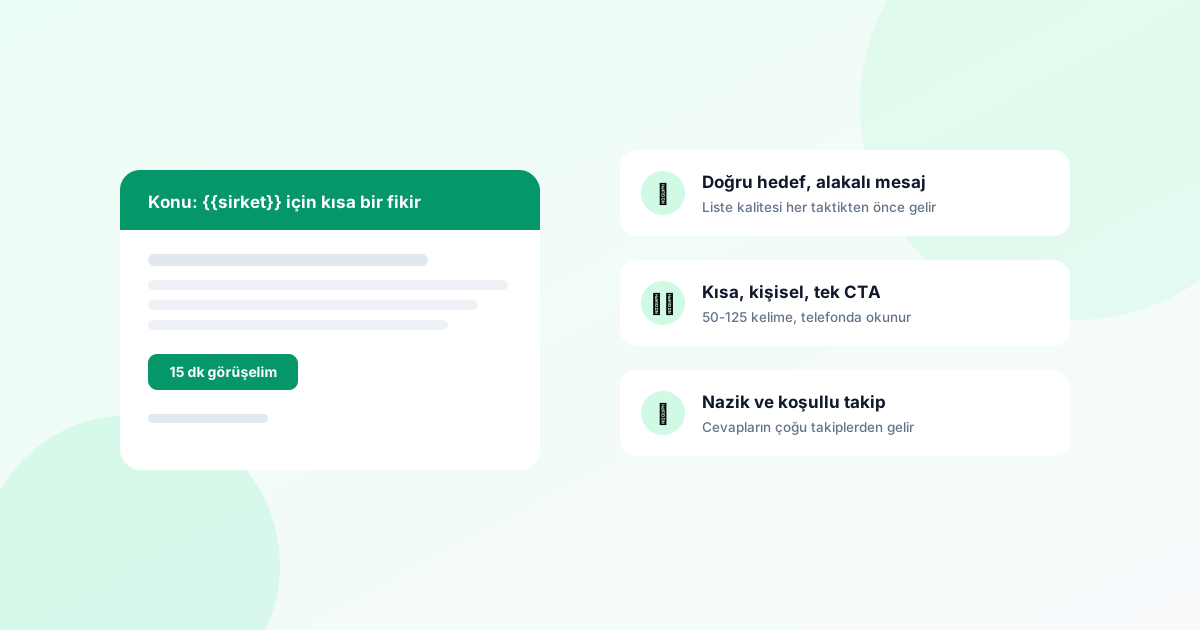
We covered what cold email is, its legal framework and its underlying logic in detail in What Is Cold Email?. As a quick refresher: cold email means taking a personalised, one-to-one business proposal to a decision-maker you have never spoken to before, but whose business could genuinely benefit from what you sell. This article is about the practical side: cold email tips that actually work in the field, from subject lines and follow-up cadence to deliverability and reply handling.
In every section below you will find concrete examples, mini templates and "do this / don't do that" level advice. At the end there is an 8-point checklist to run through before you hit send, plus answers to frequently asked questions. Grab a coffee — it is a long read, but a dense one.
Everything starts with the list: targeting and list quality
In cold email, the biggest lever is not the copy — it is the list. A perfectly written email sent to the wrong person produces zero value; a mediocre email sent to the right person can win business. Spend at least half of your time deciding who you are writing to.
- Pick a narrow segment. "Every company in the UK" is not a segment. "Metal fabricators in South Yorkshire with 10+ employees" is a segment. The narrower the segment, the more specifically your email can speak to it.
- Combine location with industry. When you write to companies in the same area and the same trade, you can open with something concrete like "we work with foundries around Sheffield" — that single sentence makes a templated email feel personal.
- Target the decision-maker. The purchasing decision is not made by an info@ address. Wherever possible, reach the owner, the managing director or the head of the relevant department.
- Keep the list small and send in waves. Instead of one blast to 5,000 people, start with segments of 100–200; learn from each wave and improve the next one.
- Weed out dead addresses. A list full of stale, abandoned or generic addresses drives up your bounce rate and erodes your sender reputation.
💡 FreshSignal tip
The art of the subject line: an unopened email is an unwritten email
The recipient makes their first decision about your email based on the subject line alone: open, ignore or delete. A good cold email subject line has three qualities: it is short (so it doesn't get cut off on mobile), specific (it contains a word from the recipient's world) and honest (it promises exactly what the email delivers).
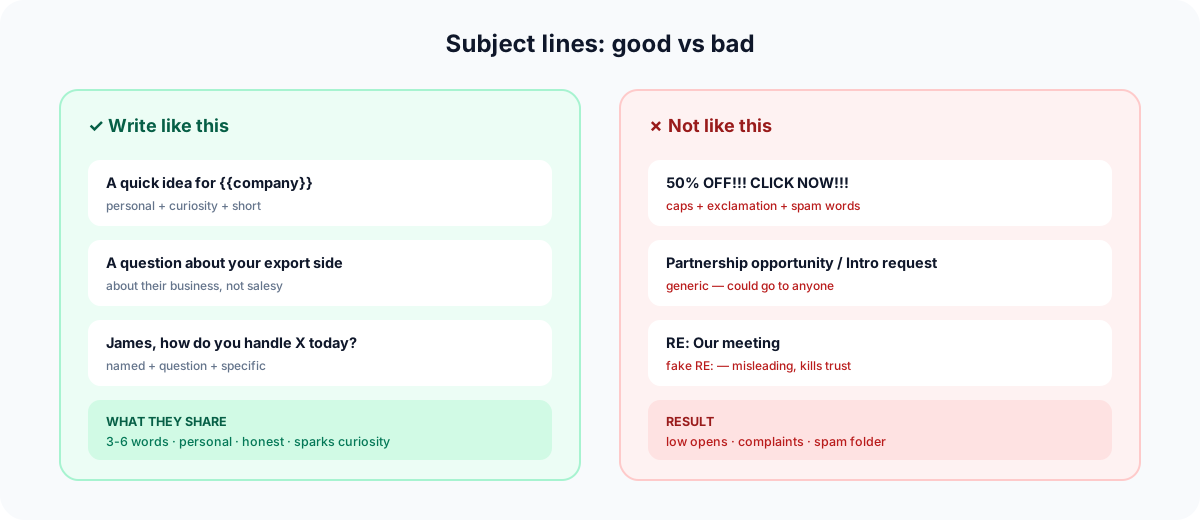
Patterns that work (with UK B2B examples)
Scrap-rate tracking for Sheffield foundries— location + sector + concrete benefit.Hartley Engineering + [your company]— two company names side by side; it reads like a personal business conversation.A quick question about your export paperwork— low-pressure, curiosity-raising, honest.A 10-minute idea for your warehouse stocktakes— stating a time commitment lowers the perceived ask and makes opening easier.
Patterns to avoid
UNMISSABLE OPPORTUNITY!!!— a pile of capitals and exclamation marks triggers both spam filters and human reflexes.Re: Our meeting— if you have never met, a fake "Re:" burns trust in the very first second.Up to 70% off, free, guaranteed— the discount/free/guarantee trio is an invitation straight to the promotions folder.We have an amazing solution just for you— a generic sentence that says nothing and could go to anyone.
ℹ️ A practical test
The opening line: your first two sentences are the shop window
Most email clients show the first line or two of your email next to the subject line as preview text. Your opening sentence is effectively a second subject line. An email that starts Hello, my name is X from company Y and I'd like to introduce our business... reads as "another sales pitch" in the preview and gets deleted unopened.
Open with the recipient, not with yourself:
I saw on your website that you ship to the EU as well — your export paperwork process is what I wanted to ask about.We've halved stocktake time for three manufacturers of your size in the West Midlands; I wondered whether you're facing something similar.Congratulations on the new Leeds site — I spotted it in the trade press. I have a short idea that could be useful at exactly this stage.
What these three examples have in common: each contains a genuine observation about the recipient, and each starts with "you" rather than "we". You can leave introducing yourself to the second paragraph — or even to your signature.
The body: write short, sell the outcome, ask for one thing
A simple formula for the body of a cold email: observation → value proposition → single CTA. 60–120 words in total is ideal; it should be readable on a phone without scrolling.
- Observation: one or two sentences showing the recipient why you are writing to them specifically (the openers above).
- Value proposition: not what you sell, but which of the recipient's problems you solve and how. Outcomes, not features: instead of "our software has an X module", say "you'll produce your dispatch paperwork from one screen".
- Single CTA: one small, clear ask. "Would a 15-minute call work for you?" or "Shall I send over a short example?" — don't ask for a demo, a brochure, a meeting and a website visit all at once; faced with too many options, the recipient picks none.
💡 Mini template
Hi [First name],

I noticed that [observation — one sentence specific to the recipient]. At [Company] we work with [similar segment] on [concrete outcome].

If something similar is on your plate, would a quick 15-minute call next week be worthwhile?

Best regards, [Signature]
Avoid attachments: adding a PDF brochure, price list or deck to a first touch both generates spam signals and creates that "sales bombardment" feeling. Share your materials in the second email, after the recipient has shown interest.
Personalisation: not filling in fields, but showing your research
Personalisation has two layers. The first layer is field-based: automatically filling in fields such as first name, company name and job title. In FreshSignal follow-up sequences you can add these fields to your template so each recipient gets an email with their own details. This layer is necessary — but not sufficient on its own. Hi James doesn't make anyone feel "special" any more.
The second layer, the one that makes the difference, is research-based personalisation: putting one sentence in the email that is specific to that company and impossible to generate automatically. Practical ways to do it:
- Spend 60 seconds on the company's website: which products do they push, do they export, have they announced anything recently?
- Personalise at segment level: if you can't write a bespoke sentence for 200 companies, split them into 4–5 sub-groups and write one observation per group that fits its reality ("manufacturers on industrial estates", "companies selling cross-border online" and so on).
- Speak the sector's language: say "scrap rate" to a foundry, "loads" to a haulier, "return rate" to an online retailer. The right jargon is the fastest proof that you know their world.
- Avoid broken personalisation: if a field is empty, don't let the template produce
Hi ,— check records with missing fields before you send.
Sender identity: who it's from matters as much as what it says
The recipient looks at the sender name before the subject line. For a sender identity that inspires trust:
- Use a real name: "Sarah Mitchell — Mitchell Packaging" will always get opened more than "info" or "Sales Team".
- Send from your own domain: writing from your company's domain rather than a free address is a baseline requirement for both trust and deliverability.
- Complete your signature: full name, job title, company, phone number and website. Nobody replies to a sender they can't identify.
- Use a replyable address: sending cold email from
noreply@is like knocking on someone's door and saying "don't answer me". The entire point of cold email is getting a reply.
In FreshSignal, follow-up sequences go out from your own mailbox: you connect your SMTP details and emails leave from your address, under your domain. The recipient never sees a third-party sender, and replies land directly in your own inbox.
Timing: which day, what time?
There is no universal truth about timing; it varies by sector and audience. That said, these are the patterns most often observed in B2B practice:
| Time slot | Assessment |
|---|---|
| Tuesday–Thursday, 9:00–11:00 am | Generally the safest window: mid-week, the inbox is being actively checked while the day is planned. |
| Monday morning | Risky: high chance of getting buried under the weekend backlog. |
| Friday afternoon | Risky: motivation to reply drops as the week winds down. |
| Evenings / nights / weekends | Avoid in B2B: your email sinks to the bottom of the pile by morning, and out-of-hours contact can feel intrusive. |
Treat these as starting assumptions and test with your own data: send to the same segment at different days and times and compare open behaviour. Your particular audience may buck the trend — owners of manufacturing firms, for example, often check email very early in the morning.
Follow-up strategy: the sale usually happens in the follow-up, not the first email
Sending one email and waiting is the most common mistake in cold outreach. The recipient may not have seen your first email on a busy day, may have seen it and forgotten, or filed it under "later". Two or three polite, value-adding follow-ups usually generate more replies than the first email itself. The key is to frame the follow-up as a reminder, not a chase.
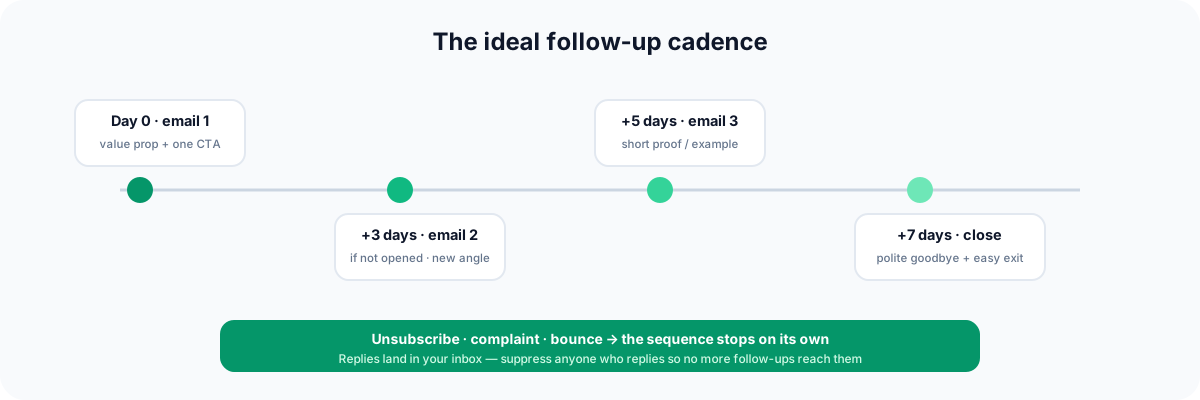
An example 4-step cadence
- Email 1 (day 0): observation + value proposition + single CTA. The template above.
- Email 2 (+3 days): a short nudge plus a small piece of extra value.
Did you get a chance to see my email last week? I thought I'd also share a short example from a similar business. - Email 3 (+5 days): a different angle. If the first email talked about efficiency, talk about cost here; never resend the same email.
- Email 4 (polite break-up): a pressure-free goodbye.
I understand this isn't a priority right now, so I won't take up more of your time. If it becomes relevant later, you can always reach me on this thread.Break-up emails get a surprising number of replies — removing the pressure makes replying easier.
Attach conditions to your cadence
In FreshSignal follow-up sequences you define a wait period and a send condition for each step. Conditions are based on open/click behaviour: "always send", "if the previous email was not opened", "if it was opened", "if clicked" or "if not clicked". For example, you can send step two only to people who didn't open the first email — with a fresh subject line — and build a more direct third step for those who clicked the link but haven't been in touch. For a detailed walkthrough, see the cold email sequence guide.
⚠️ Know when to stop
Reply handling: don't let the sequence keep emailing someone who replied
The most painful scenario in cold email sequences goes like this: the recipient replies with interest after your second email, you book a call — and three days later the sequence automatically fires off the next step: "Did you get a chance to see my email?". That one automated message undoes all the trust you just built.
Preventing this is your responsibility, and here is how it works: FreshSignal follow-up sequences send from your own mailbox, and replies land directly in your own inbox. The system does not read your inbox, so it cannot automatically detect that someone has replied. When you get a reply, you add that address to the suppression list yourself — that stops the remaining steps of the sequence going to that person.
- Make checking your inbox daily a routine while a sequence is live; ideally twice a day, morning and afternoon.
- The moment a reply arrives, your first job is adding the address to the suppression list — writing your response is the second job. Get the order wrong and an automated step can slip through in between.
- "Not interested" is a reply too: add the address to the suppression list the same way, thank them and close it out. Don't push.
- If you're going on holiday or won't be able to check the inbox, pause the sequence; never run a sequence against an unmonitored inbox.
Some stops, on the other hand, are automatic: if a recipient unsubscribes, complains or the address bounces, the sequence stops for that person on its own. The mandatory safety mechanisms are built in — the part in your hands is moving repliers onto the suppression list promptly.
Deliverability: the technical foundation of reaching the inbox
If your email lands in the spam folder, the quality of your copy is irrelevant. Deliverability stands on four legs:
1. Domain authentication: SPF, DKIM, DMARC
These three DNS records are the standard way of telling receiving servers "this email really was sent by the owner of this domain". SPF declares which servers may send on your behalf, DKIM cryptographically signs each email, and DMARC tells receivers what to do when the first two don't line up. Set up all three via your business email provider; you can verify them with free online DNS checkers. Sending cold email without these records is like turning up at border control without a passport.
2. Warm-up
Suddenly sending high volume from a new or long-dormant mailbox is a classic spam pattern in the eyes of mailbox providers. Start with a low daily volume and increase it gradually over weeks. Getting replies to your emails in the early weeks (real two-way traffic) strengthens your reputation.
3. Send rate
Dozens of emails spraying out of one mailbox per minute is not natural human behaviour. The practical way to manage this is the wave approach: enrol a small batch first (20-30 people a day on a new mailbox) and scale wave by wave as results come in. The wait days between steps already spread your sending naturally over time.
4. List hygiene
- A high bounce rate is the fastest reputation killer; weed out suspect and stale addresses before you send.
- Remove bounced addresses from your lists permanently (the sequence already stops automatically for these addresses, but don't feed the same address into another list).
- Don't persist with segments that never engage; continuing to email a dead segment drags down your overall reputation.
The honest way past spam filters
Most of the techniques marketed online as "spam filter bypass hacks" either don't work, or work briefly and then burn your domain for good. The only sustainable way past spam filters is not behaving like spam: narrow targeting, genuine relevance, sensible volume, clean technical setup.
| Spam signal | Honest alternative |
|---|---|
| Word piles like "FREE", "GUARANTEED", "LAST CHANCE" and ALL CAPS | Plain, conversational, specific copy |
| Lots of exclamation marks, emoji and loud, oversized HTML | A simple email that looks like personal correspondence |
| A body made entirely of images | Text-first body; if an image is essential, one small one |
| Link shorteners and dodgy redirects | A few clear links pointing to your own domain |
| Blasting bought mega-lists | Measured sending to narrow, relevant segments you built yourself |
| Heavy attachments in the first email (brochure PDF, deck) | Send materials on the second touch, to recipients who showed interest |
With FreshSignal's spam score pre-test on the campaign side you can check your content before sending and catch risky words and structures. But the real filter is in the recipient's head: if the email is relevant, it isn't spam; if it's irrelevant, it's spam even with the cleanest technical setup.
The legal side: a quick reminder
We covered the legal side in detail in the foundational article; here is the tips-level summary. In the UK, commercial email is governed by UK GDPR and PECR; in the EU by GDPR; in the US by CAN-SPAM; and in Turkey by KVKK and the commercial electronic message (İYS) rules. In practice, the common denominator is four principles:
- Relevance: bring an offer genuinely related to the recipient's business, and ground your B2B outreach in legitimate interest.
- Transparency: say clearly who you are and why you're writing; never use fake subject lines or fake senders.
- Easy opt-out: the recipient must be able to leave your list in one step, and the request must be honoured immediately and without argument.
- Record-keeping: track who you emailed, when and on what basis; never contact opt-outs or complainants again.
⚠️ Note
The measure-and-improve loop
There is no "one correct template" in cold email; you only find what works for your segment by measuring. Set up a simple loop: send → measure → change one variable → send again.
- Open behaviour is the test of your subject line and sender identity. If opens are low, change the subject line and the send time first.
- Click behaviour (if your email contains a link) shows whether the offer sparks curiosity.
- Replies are the real goal, and they land in your own inbox; note down yourself how many replies each sequence and each segment produced. Even a simple spreadsheet (segment, sends, replies, meetings) reveals which combination works within a few waves.
- The one-variable rule: change only one thing per wave — the subject line, or the opener, or the CTA. Change three things at once and you'll never know which one moved the needle. You run this comparison manually, by duplicating a sequence and changing a single element.
- Watch the negative signals too: if bounces and complaints are rising, cut volume and review the list; these signals say "target better", not "send more".
The 10 most common mistakes
- Sending one email and never following up (or the opposite: smothering people with 6–7 emails).
- Writing to "everyone" — no segment, no relevance, no replies.
- Opening with yourself: "Our company, established in 1995..."
- Three different asks in one email: demo + brochure + meeting + website.
- Sending heavy attachments in the first email.
- Broken personalisation:
Hi ,or the wrong company name. - Starting to send without setting up SPF/DKIM/DMARC.
- Sending high volume from a brand-new mailbox on day one.
- Forgetting to add repliers to the suppression list and letting the sequence keep emailing them.
- Sticking with the same template without measuring — never learning wave by wave.
Before you hit send: the 8-point checklist
Before you press start on a sequence, tick off these eight items one by one:
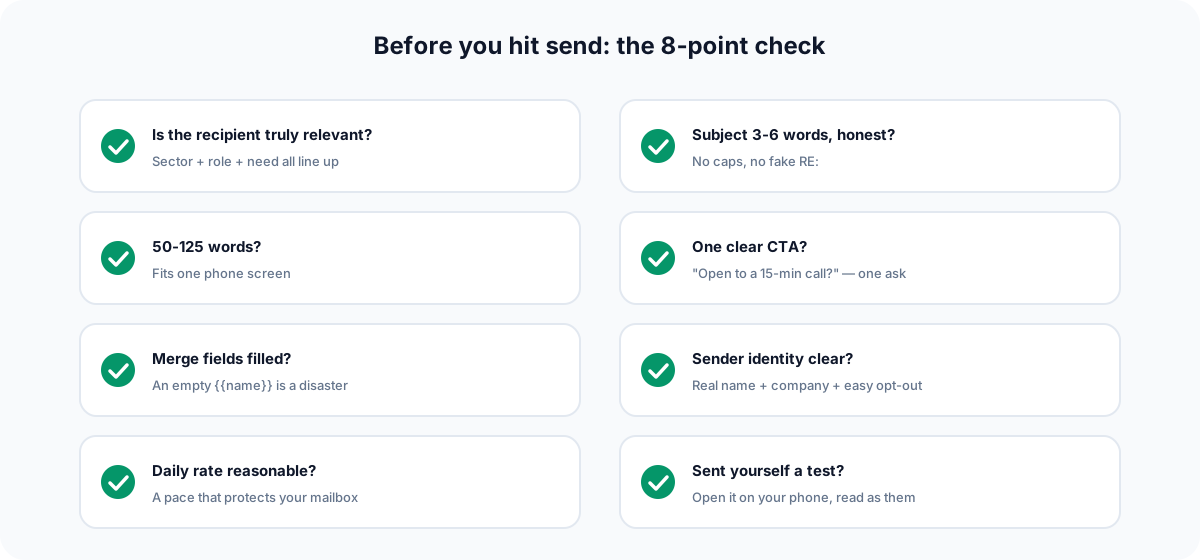
- Is the list narrow and relevant? (Is there a clear answer to "why is this company receiving this email?")
- Are SPF, DKIM and DMARC records set up and verified?
- Is the subject line short, specific and honest? No pile of capitals or exclamation marks?
- Do the first two lines open with the recipient or with you? How do they look in the preview?
- Is there a single, clear CTA? No heavy attachments?
- Have the personalisation fields been tested? No records left with empty fields?
- Is the cadence sensible (2–4 steps, 3+ day gaps, a polite break-up) and are the step conditions set correctly?
- Is your sending pace sensible (small waves on a new mailbox, start with a small batch)? Is someone going to check the inbox every day?
In practice with FreshSignal: setting up a sequence in 15 minutes
You can apply every tactic in this article with FreshSignal's Follow-up Sequences tool (in the Automation section). The flow works like this:
- Build your list: create a segment from the database of 7.9 million companies using location and industry (NACE) filters, or import your Excel/CSV file or CRM records.
- Connect your mailbox: connect your own address with your SMTP details; every email goes out from your own mailbox, under your own domain.
- Build the sequence: create a multi-step sequence and give each step a wait period and a condition ("always send", "if the previous email was not opened", "if opened", "if clicked", "if not clicked"). Personalise with first name, company and job title fields.
- Keep the pace measured: enrol a small batch first and scale wave by wave as results come in; the wait days spread sending naturally.
- Handle replies: replies land in your own inbox; add repliers to the suppression list so the remaining steps don't go to them. On unsubscribe, complaint or bounce, the sequence already stops for that recipient on its own.
Follow-up sequences are available on the Professional plan ($39/month) and above; see the pricing page for plan details. The step-by-step cold email sequence guide is ready when you are; you can browse the guide centre for other topics, or head to the dashboard and build your first sequence.
Summary: the short list of what works in cold email
- Spend half your time on the list: narrow segment + decision-maker + clean addresses.
- Subject line short, specific, honest; opening line starts with the recipient.
- 60–120 words, one value proposition, one CTA, no attachments in the first email.
- Personalisation = fields (name/company/title) + one observation specific to that company.
- A 2–4 step cadence, 3+ day gaps, a fresh angle in every follow-up, a polite break-up.
- Add repliers to the suppression list yourself; check your inbox every day.
- SPF/DKIM/DMARC + warm-up + a measured pace + list hygiene = deliverability.
- Beat spam filters with relevance, not tricks; measure one variable at a time and improve wave by wave.
Done right, cold email is still one of the most direct and most measurable channels in B2B. You don't need to apply every tip in this article at once — start with a small segment, learn from the first wave, improve one thing per wave. And whenever you want to refresh the fundamentals, What Is Cold Email? is right there.
How many follow-up emails should I send in a cold email sequence?
In practice, 2–4 steps (the first email plus 1–3 follow-ups) is a sensible range. Leave at least 3 days between steps, bring a fresh angle or a small piece of extra value in each follow-up, and finish with a pressure-free break-up email. Don't push after the break-up; you can try again in a few months with a new, genuine reason.
Does the follow-up sequence stop automatically when someone replies?
No. FreshSignal follow-up sequences send from your own mailbox and replies land in your own inbox; because the system does not read your inbox, it cannot detect a reply automatically. To stop the remaining steps going to a replier, you add that address to the suppression list yourself. The sequence does stop on its own on unsubscribe, complaint or bounce.
What is the best day and time to send cold email?
There is no universal answer; in B2B, Tuesday to Thursday mornings are usually a safe starting point. Monday mornings and Friday afternoons are risky, and evenings and weekends are generally unproductive in B2B. The right approach is to test different days and times on your own segment and compare open behaviour.
My emails are landing in spam — what should I do?
Check the technical foundation first: are SPF, DKIM and DMARC set up? Then look at behaviour: high volume from a new mailbox, a high bounce rate, spammy wording and an irrelevant list are the most common causes. Lower your daily send rate, narrow and clean the list, and run your content through the spam score pre-test.
Is sending cold email legal?
Done properly, B2B cold email is a legitimate form of outreach in many countries; UK GDPR and PECR apply in the UK, GDPR in the EU, CAN-SPAM in the US, and KVKK/İYS in Turkey. The common principles are relevance, legitimate interest, transparency and easy opt-out. See our foundational article for detail; this content is not legal advice — consult a legal adviser about your own situation.
Which FreshSignal plan includes follow-up sequences?
Follow-up sequences are available on the Professional plan ($39/month) and above; there is no free plan. Sequences live in the Automation section, and you send from your own address by connecting your own SMTP mailbox. See the pricing page for the current plan comparison.